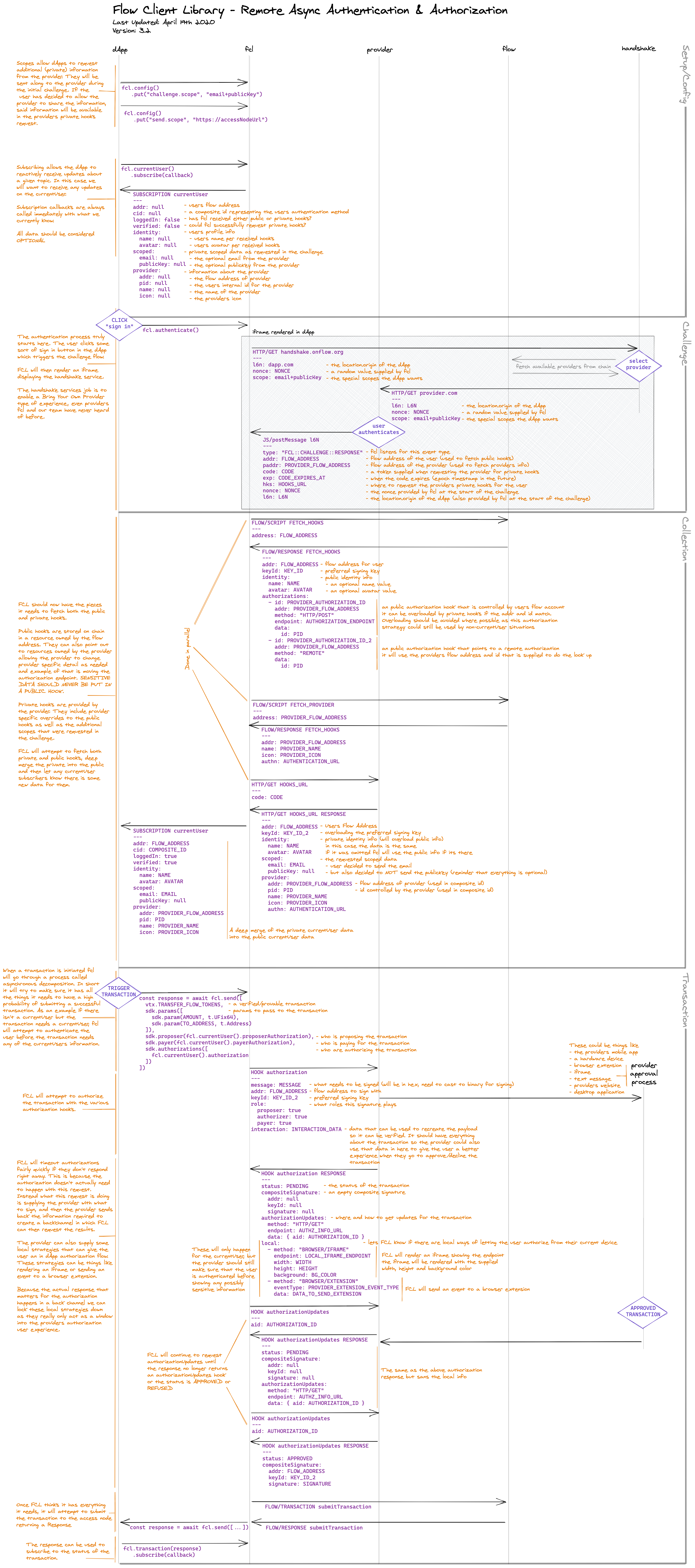
Introduction
A Wallet Provider handles Authentications and Authorizations. They play a very important role of being the place the users control their information and approve transactions.
One of Flow CLient Library's (FCL) core ideals is for the user to be in control of their data, a wallet provider is where many users will do just that.
FCL has been built in a way that it doesn't need to know any intimate details about a Wallet Provider up front; they can be discovered when the users wishes to let the dApp know about them. This gives us a concept we call Bring Your Own Identity.
Identity
Conceptually, FCL thinks of identity in two ways: Public and Private.
Public identity will be stored on chain as a resource and publicly available to anyone that knows the Flow Address for the account.
In FCL, you can easily retrieve a user's public identity:
_10import { user } from '@onflow/fcl';_10_10const identity = await user(flowAddress).snapshot();_10// ^_10// `------ The public identity for `flowAddress`_10_10const unsub = user(flowAddress).subscribe((identity) => console.log(identity));_10// ^_10// `------- The public identity for `flowAddress`
Private identity will be stored by the Wallet Provider and only be available to the currentUser.
In FCL, when you retrieve the currentUsers identity, it fetches both the public and the private identities, which merges the private into the public. Private info needs to be requested via scopes before the challenge step, more on that later.
We highly recommend Wallet Providers let the user see what scopes are being requested, and decide what scopes to share with the dApp.
Consumers of identities in FCL should always assume all data is optional, and should store as little as possible. FCL will make sure the users always see the latest.
_10import { config, currentUser, authenticate } from '@onflow/fcl';_10_10config.put('challenge.scope', 'email'); // request the email scope_10_10const unsub = currentUser().subscribe((identity) => console.log(identity));_10// ^_10// `------- The private identity for the currentUser_10_10authenticate(); // trigger the challenge step (authenticate the user via a wallet provider)
Identity data
- All information in Identities are optional and may not be there.
- All values can be stored on chain, but most probably shouldn't be.
We would love to see Wallet Providers allow the user to control the following info publicly, sort of a public profile starter kit if you will.
FCL will always publicly try to fetch these fields when asked for a user's information, and it will be up to the Wallet provider to make sure they are there and keep them up to date if the user wants to change them.
name-- A human readable name, alias, or nym for a dApp user's display name.avatar-- A fully qualified url to a smaller image used to visually represent the dApp user.cover-- A fully qualified url to a bigger image, could be used by the dApp for personalization.color-- A six character hex color, could be used by the dApp for personalization.bio-- A small amount of text that a user can use to express themselves.
If we can give dApp developers a solid foundation of usable information that is in the direct control of the users from the very start, which we belive the above fields would do, our hopes are they can rely more on the chain and will need to store less in their own database.
Private data on the other hand has more use cases than general data. It is pretty easy to imagine that you'd order something and need information like contact details and where to ship something.
Eventually, we would love to see that sort of thing handled completely onchain, securely, privately and safely. In the interm ,it probably means that you'll store a copy of data in a database when it's needed, and a user allows it.
The process for a dApp to receive private data is as follows:
- The dApp requests the scopes they want up front
fcl.config().put("challenge.scope", "email+shippingAddress"). - The user authenticates
fcl.authenticate()and inside the Wallet Providers authentication process decides its okay for the dapp to know both theemailand theshippingAddress. The user should be able to decide which information to share, if any at all. - When the dApp needs the information they can request it from FCLs current cache of data, if it isn't there, the dApp needs to be okay with that and adjust accodingly.
Below are the scopes we want to support privately: FCL will only publicly and privately try to fetch these when specified up front by a dApp.
emailfullNamephonetextMessageaddressshippingAddresslocationpublicKey
All of the above are still subject to change as it is still early days. We would like to work closely with Wallet Providers to produce a robust, detailed and consistent spec for scopes. Feedback and thoughts are always welcome.
Authentication challenge
Authentication can happen one of two ways:
- Iframe Flow
- Redirection Flow
As a Wallet Provider, you will be expected to register a URL endpoint (and some other information) with a handshake service (FCL launches with one in which registration happens on chain and is completely open source (Apache-2.0 lincense)).
This registered URL will be what is shown inside the iFrame or where the dapp users will be redirected.
For the remainder of this documentation, we will refere to it as the Authentication Endpoint and pair it with the GET https://provider.com/flow/authentication route.
The Authentication Endpoint will receive the following data as query params:
l6n(required) -- location (origin) of dApp.nonce(required) -- a random string supplied by the FCL.scope(optional) -- the scopes requested by the dApp.redirect(optional) -- where to redirect after the authentication challenge is complete.
_10GET https://provider.com/flow/authenticate_10 ?l6n=https%3A%2F%2Fdapp.com_10 &nonce=asdfasdfasdf_10 &scope=email+shippingAddress_10 &redirect=https%3A%2F%2Fdapp.com%2Fflow%2Fcallback_10_10The values will use javascripts `encodeURIComponent` function and scopes will be `+` deliminated.
We can tell that this challenge uses the Redirect Flow because of the inclusion of the redirect query param. The Iframe Flow will still need to be supported, as it will be the default flow for dapps.
At this point, it's on the Wallet Provider to do their magic and be confident enough that the user is who they say they are. The user should then be shown in some form what the dApp wants via the scopes and allow them to opt in or out of anything they want.
After the Wallet Provider is ready to hand back control to the dapp and FCL, it needs to redirect or emit a javascript postMessage event to complete the challenge.
Redirecting will look like this:
_10GET https://dapp.com/flow/callback # supplied by the redirect query param above_10 ?l6n=https%3A%2F%2Fdapp.com # the l6n supplied by FCL above_10 &nonce=asdfasdfasdf # the nonce supplied by FCL above_10 &addr=0xab4U9KMf # address for the users flow account (if available) -- will be used to fetch public identity information and hooks_10 &padder=0xhMgqTff86 # address for the Wallet Providers account -- will be used to fetch provider information_10 &code=afseasdfsadf # a token supplied to FCL from the Wallet Provider, FCL will use this token when requesting private information and hooks, can be any url safe value_10 &exp=1650400809517 # when the code expires, a value of `0` will be considered as never expires_10 &hks==https%3A%2F%2Fprovider.com%2Fhooks # a URL where FCL can request the private information and hooks
Iframe will look like this:
_13parent.postMessage(_13 {_13 type: 'FCL::CHALLENGE::RESPONSE', // used by FCL to know what kind of message this is_13 addr: '0xab4U9KMf',_13 paddr: '0xhMgqTff86',_13 code: 'afseasdfsadf',_13 exp: 1650400809517,_13 hks: 'https://provider.com/hooks',_13 nonce: 'asdfasdfasdf',_13 l6n: decodeURIComponent(l6n),_13 },_13 decodeURIComponent(l6n),_13);
FCL should now have everything it needs to collect the Public, Private and Wallet Provider Info. The Wallet Provider info will be on chain so its not something that needs to be worried about here by the Wallet Provider.
You should be aware of how to handle the hooks request, which was supplied to FCL via the hks value in the challenge response https://provider.hooks. The hooks request will be to the hks value supplied in the challenge response. The request will also include the code as a query param.
_10GET https://povider.com/hooks_10 ?code=afseasdfsadf
This request needs to happen for a number of reasons.
- If it fails, FCL knows something is wrong and will attempt to re-authenticate.
- If is succeeds, FCL knows that the code it has is valid.
- It creates a direct way for FCL to "verify" the user against the Wallet Provider.
- It gives FCL a direct way to get Private Identity Information and Hooks.
- The code can be passed to the backend to create a back-channel between the backend and the Wallet Provider.
When users return to a dApp, if the code FCL stored hasnt expired, FCL will make this request again to stay up to date with the latest informtaion. FCL may also intermitently request this information before some critial actions.
The hooks request should respond with the following JSON
_22const privateHooks = {_22 addr: "0xab4U9KMf", // the flow address this user is using for the dapp_22 keyId: 3, // the keyId the user wants to use when authorizing transaction_22 identity: { // the identity information fcl always wants if its there, will be deep merged into public info_22 name: "Bob the Builder",_22 avatar: "https://avatars.onflow.org/avatar/0xab4U9KMf.svg"_22 cover: "https://placekittens.com/g/900/300",_22 color: "cccc00",_22 bio: "",_22 },_22 scoped: { // the private info request in the original challenge_22 email: "bob@bob.bob", // the user said it was okay for the dapp to know the email_22 shippingAddress: null, // the user said it was NOT okay for the dapp to know the shippingAddress_22 },_22 provider: {_22 addr: "0xhMgqTff86", // the flow address for the wallet provider (used in the identity composite id)_22 pid: 2345432, // the wallet providers internal id for the user (used in the identity composite id)_22 name: "Super Wallet",_22 icon: "https://provider.com/assets/icon.svg",_22 authn: "https://provider.com/flow/authenticate",_22 }_22}
When FCL requested the Public info from the chain, it expects something like this. It will be on the Wallet Provider to keep this information up to date.
_22const publicHooks = {_22 addr: "0xab4U9KMf",_22 keyId: 2,_22 identity: {_22 name: "Bob the Builder",_22 avatar: "https://avatars.onflow.org/avatar/0xab4U9KMf.svg"_22 cover: "https://placekittens.com/g/900/300",_22 color: "cccc00",_22 bio: "",_22 },_22 authorizations: [_22 {_22 id: 345324539,_22 addr: "0xhMgqTff86",_22 method: "HTTP/POST",_22 endpoint: "https://provider.com/flow/authorize",_22 data: {_22 id: 2345432_22 }_22 }_22 ]_22}
At this point, FCL can be fairly confident who the currentUser is and is ready to initiate transactions the user can authorize.
Authorization
FCL will broadcast authorization requests to the Public and Private authorization hooks it knows for a User, in a process we call Asynchronous Remote Signing.
The core concepts to this idea are:
- Hooks tell FCL where to send authorization requests (Wallet Provider)
- Wallet Provider responds imediately with:
- a back-channel where FCL can request the results of the authorization.
- some optional local hooks ways the currentUser can authorize.
- FCL will trigger the local hooks if they are for the currentUser.
- FCL will poll the back-channel requesting updates until an approval or denial is given.
Below is the public authorization hook we received during the challenge above.
_10 {_10 id: 345324539,_10 addr: "0xhMgqTff86",_10 method: "HTTP/POST",_10 endpoint: "https://provider.com/flow/authorize",_10 data: {_10 id: 2345432_10 }_10 }
FCL will take that hook and do the following post requeset:
_14POST https://provider.com/flow/authorize_14 ?id=2345432_14---_14{_14 message: "...", // what needs to be signed (needs to be convered from hex to binary before signing)_14 addr: "0xab4U9KMf", // the flow address that needs to sign_14 keyId: 3, // the flow account keyId for the private key that needs to sign_14 roles: {_14 proposer: true, // this accounts sequence number will be used in the transaction_14 authorizer: true, // this transaction can "move" and "modify" the accounts resources directly_14 payer: true, // this transaction will be paid for by this account (also signifies that they are signing an envelopeMessage instead of a payloadMessage)_14 },_14 interaction: {...} // needed to recreate the message if the Wallet Provider wants to verify the message._14}
FCL expects something like this in response:
_18{_18 status: "PENDING",_18 reason: null,_18 compositeSignature: null,_18 authorizationUpdates: {_18 method: "HTTP/POST",_18 endpoint: "https://provider.com/flow/authorizations/4323",_18 },_18 local: [_18 {_18 method: "BROWSER/IFRAME",_18 endpoint: "https://provider.com/authorizations/4324",_18 width: "300",_18 height: "600",_18 background: "#ff0066"_18 }_18 ]_18}
That local hook will be consumed by FCL, which renders an iframe with the endpoint as the SRC. If the user is already authenticated, this screen could show them the Wallet Providers transaction approval process directly.
Because FCL isnt relying on any communication to or from the Iframe, it can lock it down as much as possible, and remove it once the authorization is complete. While it displays the local hook, it will request the status of the authorization from the authorizationUpdates hook.
_10POST https://provider.com/flow/authorizations/4323
We expect a response that has the same structure as the origin, but without the local hooks:
_10{_10 status: "PENDING",_10 reason: "",_10 compositeSignature: null,_10 authorizationUpdates: {_10 method: "HTTP/POST",_10 endpoint: "https://provider.com/flow/authorizations/4323",_10 },_10}
FCL will then follow the new authorizationUpdates hooks until the status changes to "APPROVED" or "DECLINED". If the authorization is declined, it should include a reason if possible.
_10{_10 status: "DECLINED",_10 reason: "They said no",_10}
If the authorization is approved, it should include a composite signature:
_10{_10 status: "APPROVED",_10 compositeSignature: {_10 addr: "0xab4U9KMf", // the flow address that needs to sign_10 keyId: 3, // the flow account keyId for the private key that needs to sign_10 signature: "..." // binary signature of message encoded as hex_10 }_10}
FCL can now submit the transaction to the Flow blockchain.
TL;DR Wallet Provider
Register Provider with FCL Handshake and implement five Endpoints.
GET flow/authenticate->parent.postMessage(..., l6n)GET flow/hooks?code=___->{ ...identityAndHooks }POST flow/authorize->{ status, reason, compositeSignature, authorizationUpdates, local }POST authorizations/:authorization_idGET authorizations/:authorization_id